

Buy Dell System or Administrator password For your new Dell Computer.

Contact us via email or WhatsApp.

Contact PWD4BIOS via WhatsApp for BIOS password assistance
Get your password in 10 minutes, Request a real professional assistance via WhatsApp or email at unlockyourlaptop@gmail.com.

Our passwords are tested and works 100% on all Laptop, Desktop, A.I.O, such as Dell: Inspiron, Latitude, Optiplex, Alienware, XPS, Precision, Vostro, Venue, Wyse, G Series, Studio and Dell Pro.

Find the reset option that matches your Dell password screen

Turn on your Dell computer and note any messages or error codes shown on the password screen. Use that information to identify which type of BIOS System, Admin or HDD password assistance you need.

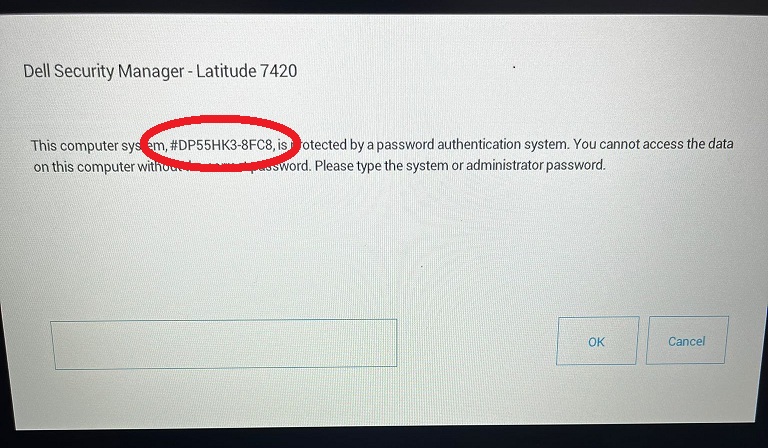
Option # 1. BIOS password reset code for Dell computers with service tags ending in 8FC8, 3FE2, CF1B, 1B58, 9ABE, or AE60 (newer devices)


See the seven-character code and suffix (XXXXXXX-XXXX) in the example below:

Dell BIOS password screen showing the 8FC8 suffix

Turn on your computer and use the system number and suffix shown on your Dell screen to choose the correct option below.


•Dell 8FC8 BIOS password reset code | Code example: 1234567-8FC8 - Note: 8FC8 is the suffix.

•Dell 3FE2 BIOS password reset code | Code example: 1234567-3FE2 - Note: 3FE2 is the suffix.

•Dell CF1B BIOS password reset code | Code example: 1234567-CF1B - Note: CF1B is the suffix.

•Dell 1B58 BIOS password reset code | Code example: 1234567-1B58 - Note: 1B58 is the suffix.

•Dell 9ABE BIOS password reset code | Code example: 1234567-9ABE - Note: 9ABE is the suffix.

•Dell AE60 BIOS password reset code | Code example: 1234567-AE60 - Note: AE60 is the suffix.

This applies to Dell systems showing one of these four-character suffixes: 8FC8, 3FE2, CF1B, 1B58, 9ABE, or AE60. The prompt asks for the system or administrator password.
Use our service to recover your Dell BIOS password. This option applies to laptops, desktops, and all-in-one computers. The password will unlock the Dell motherboard.

How to reset a Dell BIOS password and unlock setup

You can reset or unlock a Dell BIOS password in BIOS setup. Some Dell laptops may use up to four types of BIOS password.

Dell BIOS password reset

Restart the laptop and press F2 repeatedly.
Enter the Dell BIOS master password we provided.
Go to Security
Then select Passwords
Look for the Unlock Setup option
Find out what password is set or not set
Select Administrator Password if set
Then reset the password
Three fields will appear
Enter the BIOS master password in the first field
Leave the other two fields blank.
Click Save. Repeat these steps for the administrator, system, and supervisor passwords. if set,
The password should now be removed and marked as not set, and the laptop should no longer prompt for it at startup.

Our generated passwords works 100% on all Laptop, Desktop, A.I.O, such as Dell: Inspiron, Latitude, Optiplex, Alienware, XPS, Precision, Vostro, Venue, Wyse, G Series, Studio and Dell Pro.


WhatsApp contact for BIOS password assistance
Contact us
via WhatsApp.
PWD4BIOS.com reviews

PWD4BIOS on Facebook

Top Dell BIOS password resources:

Dell master password

Dell BIOS master password


Created by PWD4BIOS
Last Updated: 2026-10-10

Open every day!
Seven days a week!

Contact us by email

unlockyourlaptop
@gmail.com

WhatsApp contact for BIOS password assistance
Contact us via WhatsApp
17815831057